Deleting your account is very simple. Once your account is deleted, no information about you will remain in our system. Resources that you have subscribed to or have purchased will no longer be associated with your account. This is an unrecoverable process, so be sure that you understand what you are doing.
To delete your account, follow these steps:
1. Sign into your account
You can sign into your account from the UnifySM App or online at unifysm.com
Click the Sign In Button on the top right.
2. Select your account options
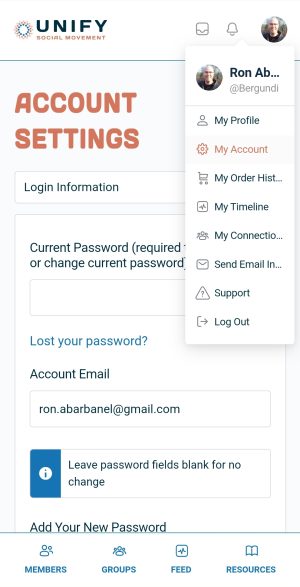
Once you have signed in, click on your avatar on the top right and select My Account.
3. Select the DELETE ACCOUNT OPTION
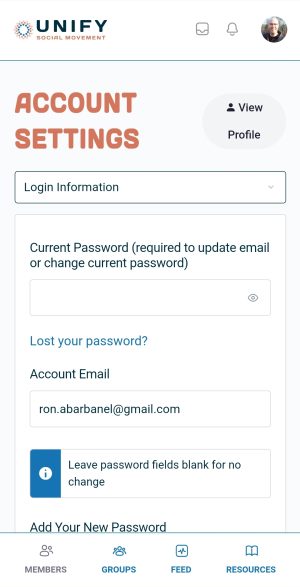
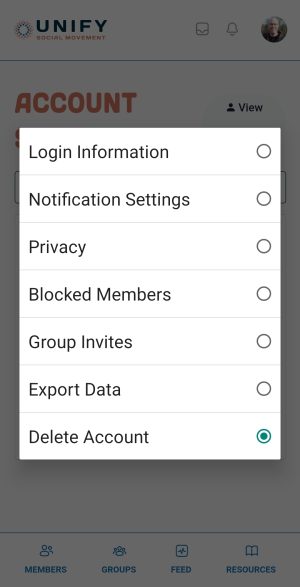
Click on the drop-down that defaults to Login Information.
Then select Delete Account.
4. Delete your Account
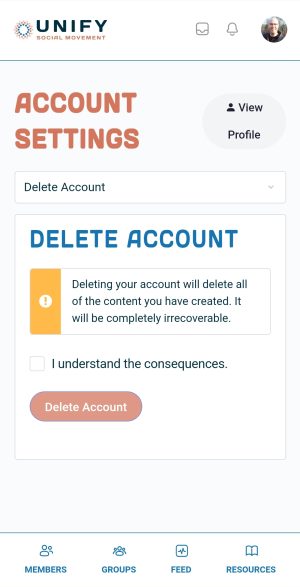
Check the box I understand the consequences.
And then click the Delete Account Button.
Report
There was a problem reporting this post.
Block Member?
Please confirm you want to block this member.
You will no longer be able to:
See blocked member's posts
Mention this member in posts
Invite this member to groups
Message this member
Add this member as a connection
Please note:
This action will also remove this member from your connections and send a report to the site admin.
Please allow a few minutes for this process to complete.